Manifest Scan Shortages
The Manifest Scan Shortages screen provides users with the ability to perform an audit check for parts entered on manifests on the RF device Scan App when there is a shortage of scanned or entered parts.
When the entry of quantities is completed and the 'Done' button is clicked on the 'Item Scan' screen, the system issues a message prompt with the following text: "Entry of quantities complete?" with an 'OK' and 'Cancel' button.
- If 'Cancel' is tapped, the message prompt disappears and the screen returns to the 'Item Scan' screen. No changes are made to parts or part quantities.
- If 'OK' is tapped and there are no missing parts from the manifest, the manifest is marked complete and the screen returns to the 'Scan Manifest Menu'.
- If 'OK' is clicked and there are missing parts from the manifest, a screen is displayed labeled 'Manifest Scan Shortages'.
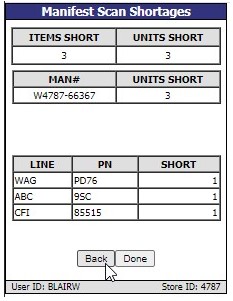
Displays the total number of items missing.
Displays the total number of units missing. There can be multiple units per item.
Displays the manifest number that the missing units were a part of.
Displays the total number of units missing on the manifest, there can be multiple units per item.
Displays the line code of the part that came up short.
Displays the part number of the part that came up short.
Displays, by line and part number breakdown, how many units short that specific part was.
Tap to return to the 'Item Scan' screen so that additional parts can be scanned.
Marks the manifest scan session complete and returns to the 'Scan Manifest' menu. If the user wants to edit this scan session in the future to perhaps scan additional items before closing the manifest, the session can be obtained from the 'Manifest Complete' selection on the 'Scan Manifest Menu'.