Plan Level Security
The Plan level Security screen is used to assign the level of authority to the security plans. User Security Plans are ranked by levels of authority. The plan levels assist in controlling a user with Enable/Edit capabilities while accessing the Employee Setup screen, and 'Employee Security' and 'Employee Pay Info' windows.
Plan Level Security is used to assist in controlling what a user with Enable/Edit capabilities is able to do while accessing the Employee Setup screen and windows, ('Employee Security' and 'Employee Pay Info'). It is not possible to:
-
Assign a new employee to a higher security plan than the current security plan when creating an employee and assigning a security plan to that employee.
-
Assign an existing employee to a higher security plan than the current security plan when modifying the employee record and reassigning a security plan to that existing employee.
-
Reassign the security plan of an employee whose current plan is ranked higher than the security plan of the logged-in employee.
Menu Path: Controls, System, Plan Level Security, Plan Level Security screen
Menu Path: Controls, System, User Security Setup, User Security Setup screen, 'Assign Plan Levels' button
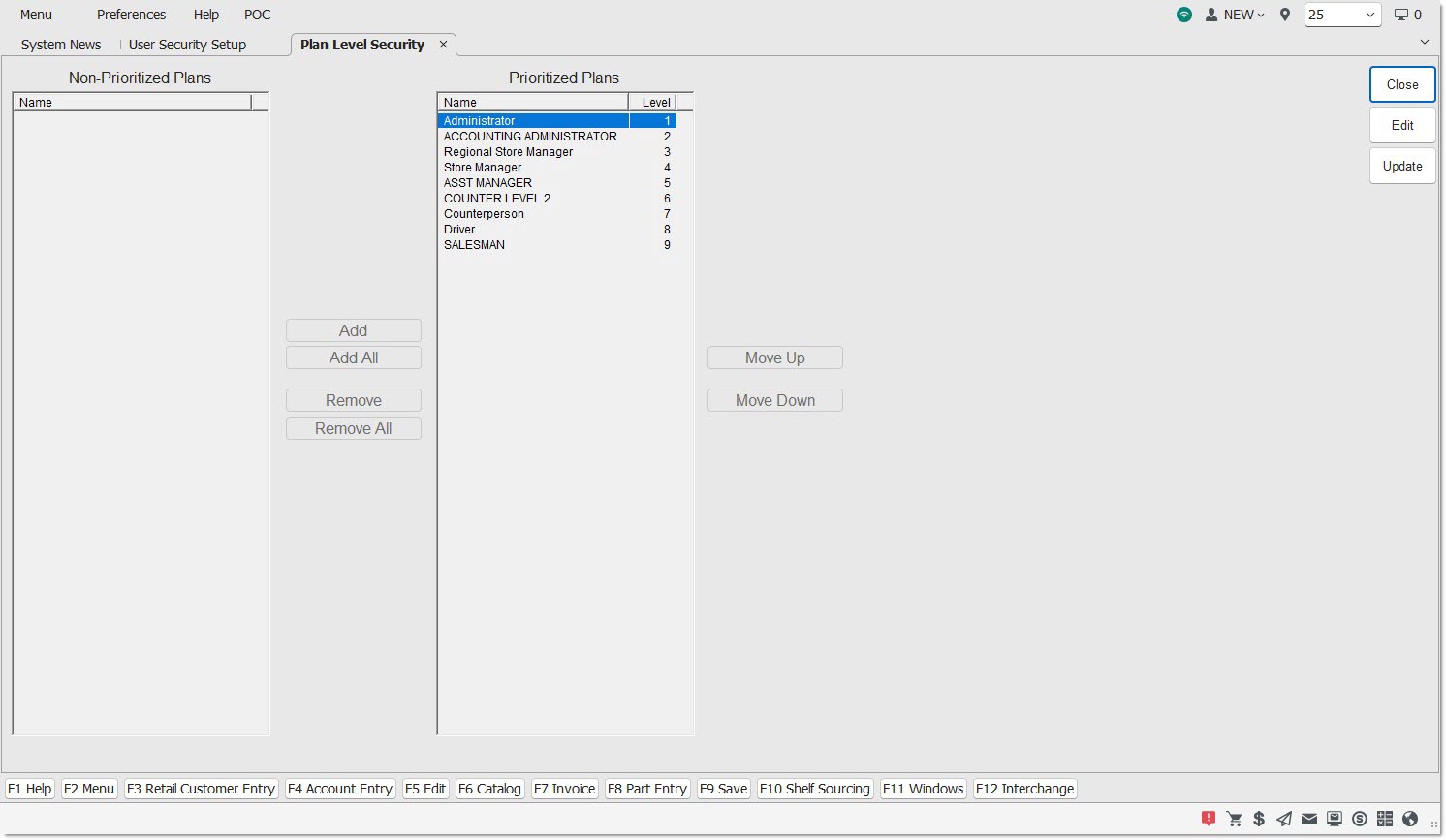
Displays the name of the security plan.
Add
Inserts the selected Non-Prioritized Plan into the 'Prioritized Plans' list. Once inserted, the security plan no longer displays in the 'Non-Prioritized Plans' list.
Add All
Inserts all 'Non-Prioritized Plans' into the 'Prioritized Plans' list. Once inserted, the security plans no longer display in the 'Non-Prioritized Plans' list.
Remove
Removes the selected security plan from the 'Prioritized Plans' list.
Remove All
Removes all security plans from the 'Prioritized Plans' list. Once removed, the security plans no longer display in the 'Non-Prioritized Plans' list.
Move Up
Moves the selected item one row up in the 'Prioritized Plans' list. When applied to a selection containing nonadjacent items, 'Move Up' works as if the command was performed on each of the items separately. As a result, the items retain their positions relative to one another.
Move Down
Moves the selected item one row down in the 'Prioritized Plans' list. When applied to a selection containing nonadjacent items, 'Move Down' works as if the command was performed on each of the items separately. As a result, the items retain their positions relative to one another.
Procedure to Add a Security Plan to the 'Prioritized Plans' List
To add a security plan to the 'Prioritized Plans' list, follow the steps below:
-
From the Menu, select Controls, System, Plan Level Security. Or, from the Menu, select Controls, System, User Security Setup. When the User Security Setup screen displays, click the 'Assign Plan Level' button. The Plan Level Security screen displays.
-
Click 'Edit'.
-
Select the appropriate security plan in the 'Non-Prioritized Plans' list.
-
Click 'Add. The security plan is inserted into the 'Prioritized Plans' list.
-
Click 'Upd'. Information is saved. Note: If changes are not saved prior to closing the screen, a prompt displays stating, "Save Changes?"