Account Tax Information
Click the 'Edit Tax' button in the Account Entry screen, or change the 'Tax Status' field to 'No' to display the 'Account Tax Information' window in order to edit/view an account's 'Sales Taxability' setup on the federal and the state levels.
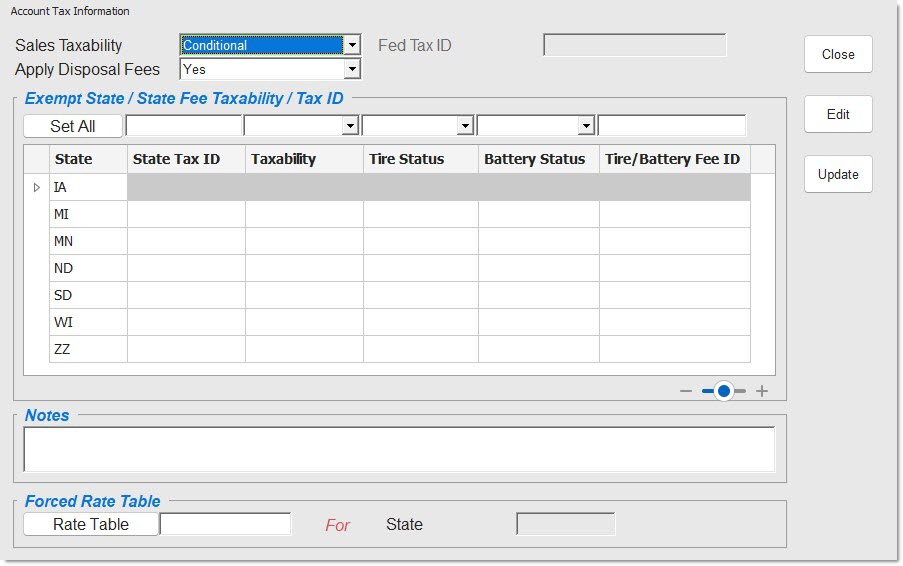
Used to define the account taxability.
Options are:
-
'Always' (taxed)
-
'Conditional' (Conditionally Taxed if the customer does not have a State Tax ID and Conditionally Not Taxed if the customer has a State Tax ID)
-
'Exempt' (Nontaxable)
Applies disposal fees.
Options are:
-
'Yes' - Applies disposal fees if a disposal 'Fee' code is set up for the part.
-
'No' - Never applies disposal fees to this account.
Displays the customer's Federal tax ID number, if applicable. The field is forced if the 'Sales Taxability' is 'Exempt' and grayed-out if 'Always' or 'Conditional'.
Set All
Stores all values entered into the 'Set All' row for all displayed states. Fields are only available when the 'Sales Taxability' is set to 'Conditional'.
State
Identifies the specific state table. Field is only available when the 'Sales Taxability' is set to 'Conditional'.
State Tax ID
Displays the state's tax ID number. ID is up to 20 alphanumeric characters. The account is exempt from the state when an ID is present. Tracks the sales transactions and is available for historical reporting. Field is only available when the 'Sales Taxability' is set to 'Conditional'.
Taxability
Defines account taxability per state. The account can be set to exempt or conditionally not taxed when an ID is entered and always taxed when an ID is not entered. Field is only available when the 'Sales Taxability' is set to 'Conditional'.
Tire Status
Indicates if the account is 'Exempt' or not when parts with the 'Sub Type' of 'Tire' are sold at Point-of-Sale. When the field is blank, the account is not exempt. Fees attached to a part are automatically entered when the part is sold at Point-of-Sale, unless the customer is exempt.
Field is only available when the 'Sales Taxability' is set to 'Conditional'.
Battery Status
Indicates if the account is 'Exempt' or not when parts with a 'Sub Type' of 'Batt' (battery) are sold at Point-of-Sale. When the field is blank, the account is not exempt. Fees attached to a part are automatically entered when the part is sold at Point-of-Sale, unless the customer is exempt. Field is only available when the 'Sales Taxability' is set to 'Conditional'.
Tire Battery Fee ID
Displays the tire/battery tax ID number. When the customer is exempt, no fees are added to the invoice regardless of whether or not the part has a fee attached. Field is only available when the 'Sales Taxability' is set to 'Conditional'.
Notes
Displays a user-entered, up to 65 alphanumeric character comment, for informational purposes only.
Rate Table
Displays the value of the tax rate table used for the account. Click the button to display the 'Browse Tax Rate Tables' window to search for a specific tax rate table. If a value exists in this field and if sales tax should be collected, regardless where the customer shops in the state identified in the 'For State' field, the 'Forced Rate Table' defined here is used for sales tax calculation for that customer. If the 'Rate Table' field is blank and sales tax should be collected, the store's 'Store Rate Tax Table' set up in the Invoice Options screen, is used for sales tax calculation for that customer.
For State
Indicates the state that the selected 'Rate Table' is identified with. Should the customer shop in a store in that state, the 'Forced Rate Table' is used for sales tax calculation. Should the customer shop in a store in any other state, that store's 'Store Rate Tax Table' setup in the Invoice Options screen, is used for sales tax calculation for that customer.
When loading an account into the Account Entry screen, the system:
-
Checks the current 'Store Rate Tax Table' in the Invoice Options screen.
-
Checks each tax authority currently configured in that tax rate table for the state the rate table is configured for.
-
Checks the account tax information record in the 'Sales Taxability' field in the 'Account Tax Information' window.
-
Checks all tax exempt records in the level taxability settings grid in the 'Account Tax Information' window.
-
Determines the account taxability for each tax authority.
-
Displays each configured account taxability per state and tax authority in the Account Entry 'Edit Tax' grid.
For example, if the 'Store Rate tax Table' is MN0000100 for Store 100 and that rate table has two taxing authorities, 'Minnesota' and 'Clark County', if the customer is displayed from Store 100, the 'Edit Tax' grid displays:
-
'Minnesota'
-
'Clark County'
And, if the customer is conditionally taxed as set up in the 'Sales Taxability' field in the 'Account Tax Information' window, the 'Edit Tax' grid displays:
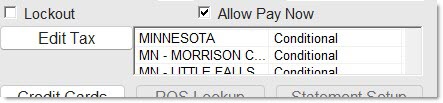
However, continuing the example, if the same customer is displayed in Store 200, which uses the MN0000200 tax rate table, the 'Edit Tax' grid displays:
The 'Exempt State' / 'State Fee Taxability' / 'Tax ID' grid is unavailable when the 'Sales Taxability' value is 'Exempt' or 'Always'. When the value is 'Conditional', the grid is active.
Taxability depends on whether or not a 'Tax ID' exists in the 'Add Exempt State' / 'ID' table for the State from which the customer is buying. When an exempt 'Tax ID' does not exist, the program follows the Conditionally Taxed rule. When an exempt 'Tax ID' exists, the program follows the Conditionally Not Taxed rule.
'Conditional' and 'Exempt' statuses prompt the program to check the 'Add Exempt State' / 'ID' table for States and/or State Tire/Battery Fees from which the customer is exempt.
When taxability is 'Exempt', and 'Upd' is clicked, the program displays a prompt stating, "A Tax ID number MUST be entered for this exempt customer. Please enter one now. OK".
When taxability is 'Conditional', and 'Upd' is clicked, the program displays a prompt stating, "Please enter a Tax ID number for exempt status for this customer. OK".
When a 'Tax ID' is entered and taxability is 'Always', the program displays a prompt stating, "State Taxability must be Conditional or Exempt".
Certain states, such as Louisiana, allow some customers to have a special rate that follows the customer throughout the state. When the customer goes to a store in another state, he is taxed at the other store's rate.
When Federal status is changed so that data no longer applies, the program retains the state data; however, the data is unavailable. In the event the Federal status is changed to a status that makes state data eligible, the state settings are visible and editable.