Promotions Setup Tab
The Promotions Setup screen is used to set up promotional pricing at point-of-sale.
Menu Path: Customer, Account Maintenance, Account Pricing, Promotions Setup, Promotions Setup screen
.png) Promotional Overview - 6 minutesPromotional Overview - 6 minutes
Promotional Overview - 6 minutesPromotional Overview - 6 minutes
Promotions Configuration - 6 minutesPromotions Configuration - 6 minutes
Campaign Setup - 4 minutesCampaign Setup - 4 minutes
Adding Promotions - 6 minutesAdding Promotions - 6 minutes
Promotions Basic Setup - 5 minutesPromotions Basic Setup - 5 minutes
Promotions Advanced Settings - 5 minutesPromotions Advanced Settings - 5 minutes
BOGO Pkg Setup - 4 minutesBOGO Pkg Setup - 4 minutes
Qty Break Single Item - 6 minutesQty Break Single Item - 6 minutes
Tender Coupon - 5 minutesTender Coupon - 5 minutes
Promotions Proration Pricing - 4 minutesPromotions Proration Pricing - 4 minutes
Invoicing Promotions 1 of 2 - 6 minutesInvoicing Promotions 1 of 2 - 6 minutes
Invoicing Promotions 2 of 2 - 5 minutesInvoicing Promotions 2 of 2 - 5 minutes
Invoicing Promotional Coupons - 6 minutesInvoicing Promotional Coupons - 6 minutes
Reporting Promotions - 6 minutesReporting Promotions - 6 minutes
The 'Promotions Setup' tab is used to continue the setup of the parts that are in a promotion.
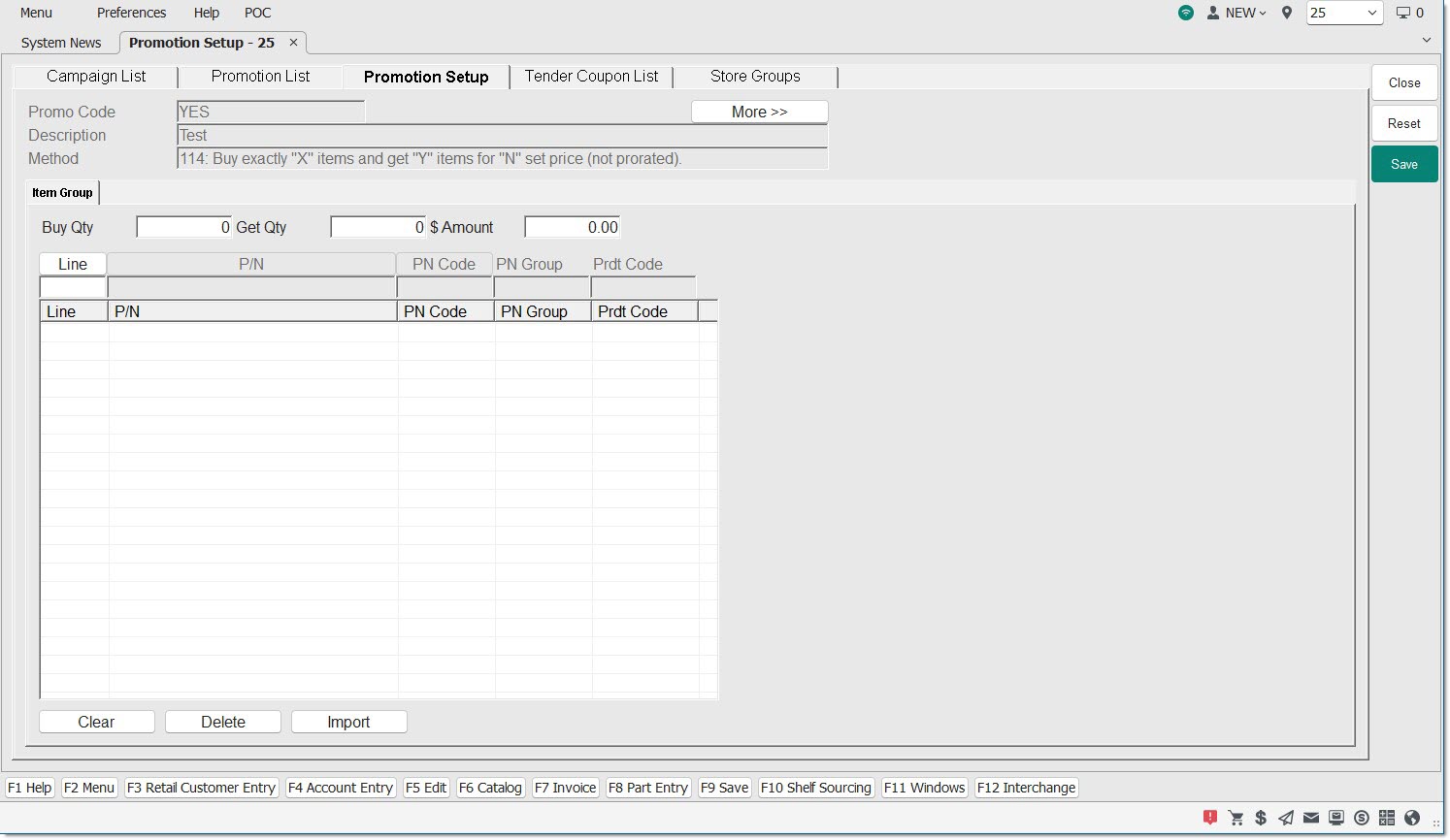
Promo Code
For information only, displays the promotion code that is being set up.
Description
For information only, displays the description of the promotion code that is being set up.
Method
For information only, displays the selected method of the promotion code being set up.
Buy Qty
Displays the amount of items the customer must buy in order to satisfy the promotion. This value is determined by the method chosen for the promotion.
More>> / Less<<
Clicking the 'More>>' button allows for additional setup through the following fields:
-
Limit Quantity
-
Starting Price Level
-
Coupon Required
-
Partial Qty

Limit Quantity
Optional field that determines the number of times promotional pricing can be applied for one promotion on the same invoice.
Starting Price Level
Based on the method selected for the promotion, the starting price level used to calculate the promotional sell price is defined as any of these options:
-
Regular Price
-
Promotion Price Level
-
Selected Price Level - from the Store Invoice Options screen
Coupon Required
When checked, a line item coupon is required to qualify for the promotion.
When checked, a line item coupon is not required to qualify for the promotion.
Note: Line item coupons are promotional coupons that are applied against a single item instead of against all items on the promotion.
Partial Qty
When partial quantity is allowed, the customer can obtain the promotional price for an item even if they do not buy the threshold amount of items in the promotion.
Get Qty
Displays the amount of items the customer receives after the 'Buy Qty' is satisfied. This value is determined by the method chosen for the promotion.
$ Amount
Displays the dollar value for the total value of the items, according to the method chosen for the promotion.
Line
Allows the entry of a line code to search for a part to add it to the grid.
P/N
Allows the entry of a part number to search for a part to add it to the grid.
PN Code
Allows the entry of a part number code to search for a part to add it to the grid.
PN Group
Allows the entry of a part number group to search for a part to add it to the grid.
Prdt Code
Allows the entry of a product code to search for a part to add it to the grid.