Create Deposit
The Create Deposit screen is used to remove the monetary values from the safe that will be taken to the bank. Each receipt envelope currently in the safe displays in the screen grid. Create Deposit is used for 'Real' drawers only.
Menu Path: Invoicing, Cash Drawer, Management Functions, Create Deposit, Create Deposit screen
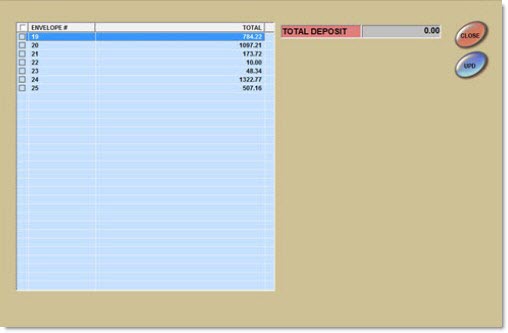
[Checkbox] Header
Selects all envelopes to be part of the deposit, when checked. Deselects all envelopes, when unchecked.
Envelope #
Displays the system-generated envelope number assigned when the receipt envelope was created.
Total
Displays the total amount in the envelope. If foreign cash is accepted and both home and foreign are in the same envelope, the field displays both the home and foreign amount. For example, 100.00 / 50.00.
[Checkbox] Grid
Selects individual envelopes in the grid to be part of the deposit, when checked. Deselects individual envelopes in the grid, when unchecked.
If all receipt envelopes are not selected when 'Upd' is clicked, a prompt displays stating, "Not all receipt envelopes have been included. The deposit may be short. Select further receipt envelopes?" Click 'Yes' and the prompt closes and the Create Deposit screen remains open without resetting. Click 'No' and the prompt closes, the safe is reduced by the amount of the deposit, a Deposit receipt prints and the Create Deposit screen closes.
Total Deposit
Displays the total deposit (home). Updates dynamically as envelopes are checked/unchecked.
Total <foreign> Deposit
Displays the total (foreign) deposit. Updates dynamically as envelopes are checked/unchecked. Only displays if foreign currency is accepted.
Deposit Receipt
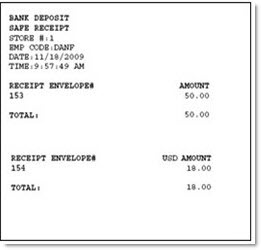
The following is an example of the Deposit Receipt.
When Currency Exchange is set up and home and foreign currency are kept in separate receipt envelopes, the receipt prints the home and foreign envelopes separately.
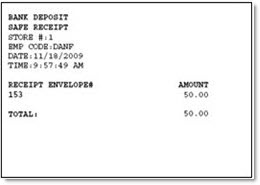
When Currency Exchange is set up, and home and foreign currency are kept in the same receipt envelope, the receipt totals the home and foreign currency separately.