Receipt Envelope
The 'Create Receipt Envelope' window is used to create a receipt envelope for the safe with any currency that is loose in the safe (not already in a receipt envelope). Bank deposits can only be made for values in receipt envelopes.
Menu Path: Invoicing, Cash Drawer, Management Functions, Receipt Envelope, 'Receipt Envelope' window
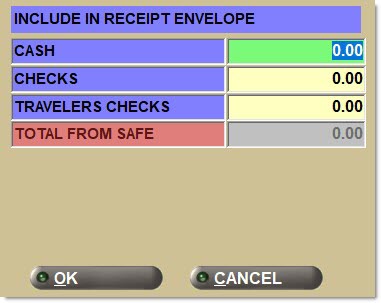
Cash
Indicates the manually entered cash amount from the safe to be added to the receipt envelope.
Checks
Indicates the manually entered checks amount from the safe to be added to the receipt envelope.
Travelers Checks
Indicates the manually entered travelers checks amount from the safe to be added to the receipt envelope.
Total From Safe
Displays a dynamic total of the values entered in the 'Cash', 'Checks', and 'Travelers Checks' fields.
<foreign currency code> Cash
Indicates the manually entered foreign cash amount from the safe to be added to the receipt envelope.
<foreign currency code> Travelers Checks
Indicates the manually entered foreign travelers checks amount from the safe to be added to the receipt envelope.
Total <foreign currency code> From Safe
Displays a dynamic total of the values entered in the foreign 'Cash' and foreign 'Travelers Checks' fields.
Ok
Creates a receipt envelope for the safe. The amount from the 'Total From Safe' / 'Total <foreign currency code> From Safe' is removed from being loose in the safe and is added to a receipt envelope. A receipt and a receipt envelope receipt print.
If the system-tracked amount in the safe (home and/or foreign) is less than the amount entered in the 'Create Receipt Envelope' window, then when 'Ok' is clicked a prompt displays stating, "Receipt Envelope exceeds safe amount. Do you wish to continue?" Click 'Yes' to create the receipt envelope. Click 'No' to cancel creating the receipt envelope.
Cancel
Closes the window without resetting and does not create a receipt envelope.