Support Portal
The Support Portal option enables access to the PartsWatch Customer Support Portal web page from the PartsWatch Main Menu by logging in with a login and password.
Menu Path: Menu, Support Portal
.png) How to: Access the CRM Support Portal - 2 minutesHow to: Access the CRM Support Portal - 2 minutes
How to: Access the CRM Support Portal - 2 minutesHow to: Access the CRM Support Portal - 2 minutes
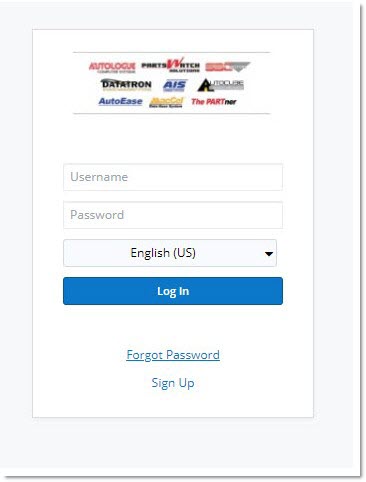
Enter the login for the support portal. This might be different from the PartsWatch login.
Password
Enter the password. This may be different from the PartsWatch password.
Remember Me
Checkbox that determines whether or not the application saves the 'Login'/'Password' information, and can log-in quickly.
- Checked - Stores the information so the information does not have to be entered every time someone looks to log in.
- Unchecked (default) - Does not store the information so the information does have to be entered every time someone looks to log in.
Log In
Provides access to the PartsWatch Support Center, when clicked.
Displays the 'Retrieve Login Credentials page', when clicked, to enable the obtaining of a 'Login' and 'Password', or the retrieving of a forgotten 'Login' or 'Password'.
Retrieve Login Credentials Page
Click 'Sign Up' to display the 'Retrieve Login Credentials' page.
If not yet registered, click on the https://autologue.sugarondemand.com/portal/index.php link to access the Customer Support Portal page to request a 'Login' and 'Password'. Complete all fields except for the attachment links. Click 'Submit'. A Customer Support Representative will contact you to provide login information.
Click 'Forgot Password' to display the 'Retrieve Login Credentials' page.
For one that is already registered, enter an email address. Information to reset the password is emailed to that email address. If the email address entered is not found in the system, a message displays stating "No email found matching the input below". Click on the https://autologue.sugarondemand.com/portal/index.php link to access the Customer Support Portal page to request a 'Login' and a'Password'.
Support Center
Once logged in, the 'Support Center' page is displayed to search for the desired product.
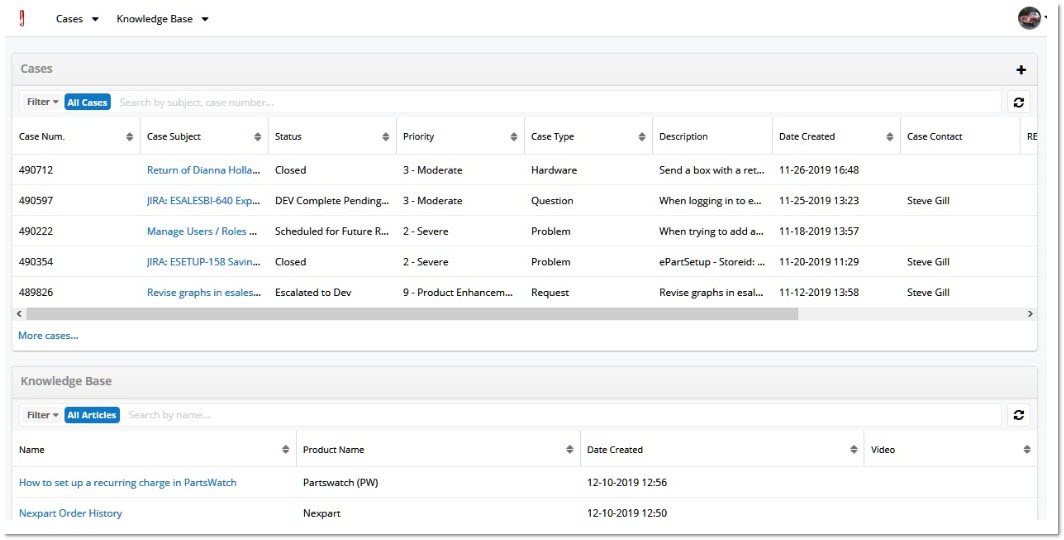
Search Support text box
Enter search words or a phrase for which help is needed.
On what product do you want to search?
Select PartsWatch from the drop-down.
Where do you want to search?
Check any or all checkboxes.
Results
Select the number of results to display on a single page.

Click to display the results page of the search.
Click the Search icon after making selections to display the results page.
Click on the underlined portion of the result to access the videos, documents or other type of help.