Enterprise Invoice Options
The Enterprise Invoice Options screen enables the setting of the enterprise security controls for invoice options. All fields are at the enterprise level; therefore, all stores in all locations are affected by these settings.
Menu Path: Controls, Enterprise, Invoice Options, Enterprise Invoice Options screen
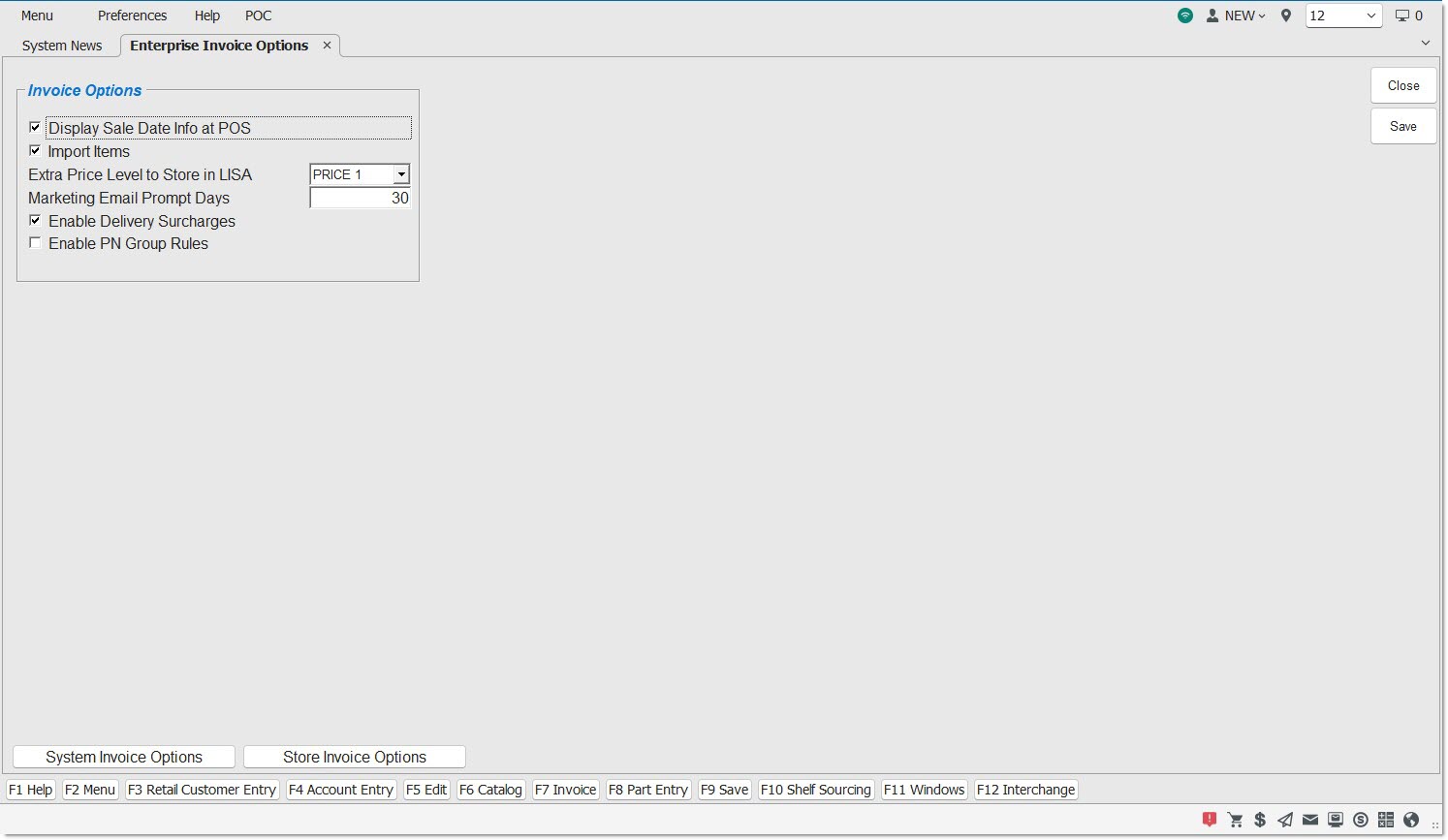
Display Sale Date Info at POS
Checkbox that determines whether or not the 'Promo Price' displays.
-
Checked - Displays the 'Promo Price' pop-up that displays the promotional sale date discount price, as set up in the Price Plan Setup screen. The pop-up is for informational purposes only so the customer can be informed of the savings.
-
Unchecked - Does not display 'Promo Price' window.
Import Items
Checkbox that determines whether or not the ability to import parts from a spreadsheet into a sales order at Point-of-Sale is allowed.
-
Checked - Importing parts from a spreadsheet at Point-of-Sale is allowed.
-
Unchecked - Importing parts from a spreadsheet at Point-of-Sale is not allowed.
Extra Price Level to Store in LISA
Displays all price level names for the current store from the Field Name Setup screen.
Note: The field names set up in the Field Name Setup screen is unique per store. The Enterprise Invoice Options screen is enterprise-wide and displays the field names that have been set up for the store that is currently accessing the screen.
Marketing Email Prompt Days
Define the number of days the system will wait from when a Retail customer is prompted to opt-in to email marketing until they are prompted again. The default value is 30 days.
Enable Delivery Surcharges
Allows the option to add delivery surcharges to all line items on an invoice for selected account groups at Point-of-Sale. (Only available when the 'Enable PN Group Rules' checkbox is unchecked).
-
Checked - The system calculates delivery surcharges.
-
Unchecked (default) – The system does not calculate delivery surcharges.
Note: It is necessary to create at least one 'Account Group' before using delivery surcharge calculations. This is accomplished using existing functionality, by clicking the 'Account Group Setup' button on this screen.
Enable PN Group Rules
Allows the option to add delivery surcharges to specific types of line items on an invoice for selected account groups at Point-of-Sale.
-
Checked - If the 'Enable PN Group Rules' checkbox is checked, and the 'Enable Delivery Surcharges' setting is unchecked, calculating delivery surcharges will not occur at Point-of-Sale. At least one 'Account Group' must be used. If the 'Enable PN Group Rules' checkbox is checked, and the 'Enable Delivery Surcharges' setting is checked, the system calculates delivery surcharges based both upon 'Account Groups' (for a list of accounts) and 'PN Groups' (for a list of parts) at Point-of-Sale.
-
Unchecked - If the 'Enable PN Group Rules' checkbox is unchecked, and the 'Enable Delivery Surcharges' setting is checked, the system calculates delivery surcharges only based upon 'Account Groups' at Point-of-Sale.