ASPM Order
Select Mode: Shelf Purchase Order
Order Method: ASPM Order
"Average Sales Per Month" (ASPM) refers to the average number of units sold (less returns and UNDOs) for a part within a fiscal or calendar monthly period.
An ASPM Order is similar to a Forecast Order except this method uses a pre-defined "rolling" sales history period of consecutive "Close" months (calculated at end-of-month), instead of a dynamic list of months selected at the time of order creation.
Note: Since this method uses "rolling" months, a profile can be set up and used in the Timed Order Queue to reorder the same parts every month as long as seasonal conditions do not apply to the parts.
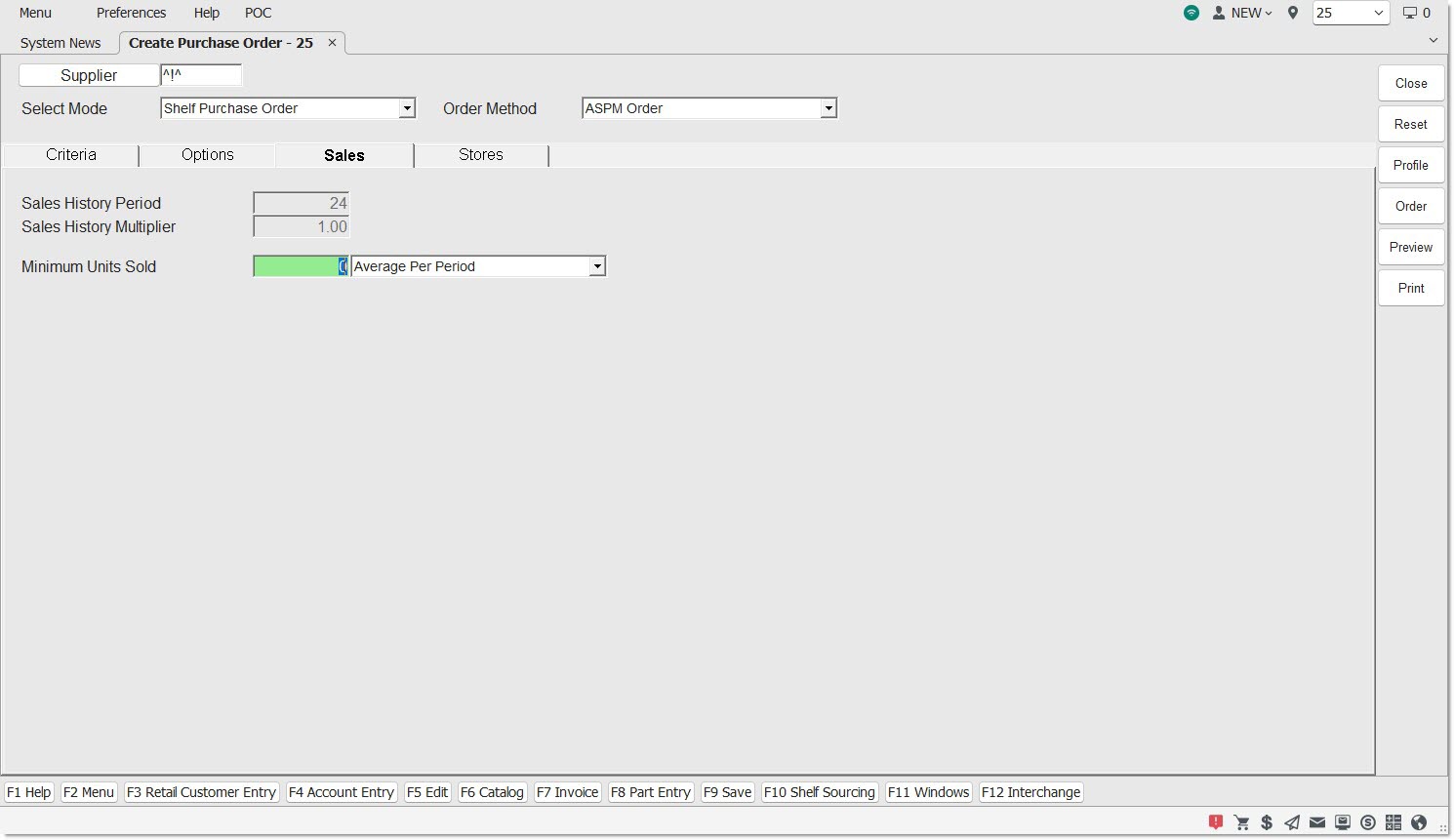
The 'Sales' tab displays when 'ASPM Order' is selected from the 'Order Method' drop-down.
Optionally click the 'Criteria' tab to select or edit the Line Codes purchased under the 'Supplier' and/or set up the filters used to narrow the parts that will be considered for the order.
Optionally click the 'Options' tab and enable/disable the predefined conditions to further refine and filter the parts that will be considered for the order:
Available Default/Override (left-side) filters are:
Additional (right-side) filters are:
Optionally, click the 'Stores' tab and select the stores for multi-order.
On the 'Sales' tab identify:
Sales History Period
Displays the number of months or periods in the "rolling history" as set up in the store-level 'Sales History Period' control field or the Line Code-level 'Sales History' Period as an override. The 'Sales History Period' is relative to the most recent end-of-month. The "rolling" sales periods are all recalculated during each end-of-month period.

Each part's Sales History Period, "total units sold" within the 'Sales History Period', and the resulting "average sales per period" will determine, with other rules, whether the part is included on the ASPM Order, and if included, the part's order quantity.
For example, if the 'Sales History Period' value is a duration of 24 consecutive periods since the last end-of-month close:
- If a part's Sales History period is 24 periods, and
- The "total units sold" within the sales history period is 63 units, then
- The "average sales per period" is 2.625 units (63 / 24), then
- The part's order quantity, after standard rounding rules are applied, will be rounding up to 3 whole units ordered, without any other rules applied.
Second example:
- If a part's 'Sales History Period' is 24 periods, and
- The "total units sold" within the sales history period is 10 units, then
- The "average sales per period" is 0.416 units (10 / 24), then
- The part, after standard rounding rules are applied, will be rounded down to zero, and the part will not be included in the order, without any other rules applied.
Note: Changing the 'Sales History Period' will not impact the current order. It will only impact the recalculation of the rolling periods at the next end-of-month.
Sales History Multiplier
Displays the store-level 'Sales History Multiplier' as set up in the store-level 'Sales History Multiplier' control field or the Line Code-level 'Sales History' Period as an override.
Unlike Forecast orders, where the number of days to cover can be specified, ASPM orders always cover one monthly period. To expand the number of months to cover, change the store-level 'Sales History Multiplier' setting. For example, changing the setting to '3' covers 3 months. Decimal values can be entered in the field if needed. For example, enter '0.5' for half a month.
If the 'Sales History Multiplier' is changed from its default value of '1.00', the weighted average sales will be higher or lower than the average sales calculated for all parts on the order. A "higher" change will enable covering inventory needs for more future periods.
For example, if the average sales per month (ASPM) calculated for a part is 2, but the 'Sales History Multiplier' is set to '1.5', then the "weighted" average sales is now calculated to 3. If the part's quantity available is 2, then 1 unit is ordered for this part (3 - 2 = 1). If the 'Sales History Multiplier' had been left with its default value of '1.00' then this part would not have been ordered (2 - 2 = 0).
Note: The average number of units sold number is typically fractional (e.g. 2.3 or 4.7) and standard rounding rules are used to calculate a part's order or return order quantity (i.e. 2.3 would be 2 and 4.7 would be 5).
Note: Changing the 'Sales History Multiplier' will be used during order creation by all order and return order methods involving ASPM. Using a revised 'Sales History Multiplier' allows enough parts to be ordered for any number of months.
Minimum Units Sold
Used to determine the quantity of units sold in order to be reordered. To order more of the popular movers, increase the field value. The field defaults to '0' and can be edited to a value from '1' to '999999999'.
Click the drop-down field to select the method used to limit the parts in the order based on either:
- 'Average Period' - Number of units sold per period
- 'Total Across Period' - Number of units sold across the entire sales history period.
Entering a value for 'Minimum Units Sold' limits the parts on the order based on either an average number of units sold per period or a total number of units sold across the entire sales history period. The same minimum limit is applied to all parts regardless of Line or Type of parts.
Note: This option enables only "fast selling" parts to be included on an ASPM Order.
For example, to include parts on the order that had greater than an average of 20 units sold per period, enter a 'Minimum Units Sold' of '20' and select the default value of 'Average Per Period'. The result of these selections is that parts with an 'Average Per Period' of '20.01' or higher would still be eligible for inclusion on the order, and parts with an 'Average Per Period' of '19.99' or lower, would immediately be excluded.
For each part evaluated:
- All "chained" superseded parts are included when calculating a part's "total or average units sold" within the sales history period.
- Meaning, if part "E" supersedes part "D", the "total units sold" for part "E" is the sum of both parts.
- If part "C" supersedes part "B", and part "B" supersedes part "A", the "total units sold" for part "C" is the sum of all three parts.
For example, within a 24 month sales history period, part "C" is being evaluated against '400' 'Minimum Units Sold'. If 200 units of part "C", 200 units of part "B", and 80 units of part "A" were sold, then the "total units sold" of part "C" would be 480, and would exceed the 'Minimum Units Sold' of '400', which would include the part on the order.
When ready, optionally click the 'Preview' or 'Print' button to output a report with all parts that will be on the order, or click the 'Order' button to generate the order.
When the 'Order' button is clicked, part order quantities use the following formula:
The parts on the order are limited based on the part selection rules on the 'Criteria' tab.
- Each part's 'SALES HISTORY PERIOD' is obtained from the "rolling part history" table.
- If the 'SALES HISTORY PERIOD' is zero (meaning the 'CREATE DATE' was within the end-of-month close, and the part has no prior full months of sales history), and the part is not involved in a "supersession", the part is excluded from the order.
- If the 'SALES HISTORY PERIOD' is zero, and the part is involved in a "supersession", the 'SALES HISTORY PERIOD' of the oldest part is used.
- Note: A "supersession" exists if a part is "linked".
- For example, if Part "D" has a 'SALES HISTORY PERIOD' of '0', but supersedes Part "E" (which has a 'SALES HISTORY PERIOD' of '12'), 12 is used for the 'SALES HISTORY PERIOD' of both Parts "D" and "E".
- As another example, if Part "D" has a 'SALES HISTORY PERIOD' of '0', but supersedes Part "E" (which has a 'SALES HISTORY PERIOD' of '12'), and Part "E" supersedes Part "F" (which has a 'SALES HISTORY PERIOD' of '24'), 24 is used for the 'SALES HISTORY PERIOD' of Parts "D", "E", and "F".
- Note: Parts "E" and "F" may also appear on the order if they are within the Line, and their 'DNR' flag on the Part Entry screen is unchecked.
- Each part's 'TOTAL UNITS SOLD' is obtained from the "rolling part history" table.
- If the 'TOTAL UNITS SOLD' is zero (meaning the part had no sales within the 'SALES HISTORY PERIOD'), then the part is excluded from the order.
- If the 'TOTAL UNITS SOLD' is non-zero, but the 'SALES HISTORY PERIOD' is zero, and the part is not involved in a "supersession", the part is excluded from the order.
- If the 'TOTAL UNITS SOLD' is non-zero, but the 'SALES HISTORY PERIOD' is zero, and the part is involved in a "supersession", the 'TOTAL UNITS SOLD' is included in the aggregated 'TOTAL UNITS SOLD' across all parts in the "supersession chain".
- For example, if:
- Part "G" has a 'TOTAL UNITS SOLD' of '5',
- Part "H" has a 'TOTAL UNITS SOLD' of '24',
- Part "G" has a 'SALES HISTORY PERIOD' of '0',
- Part "H" has a 'SALES HISTORY PERIOD' of '12',
- Part "G" supersedes Part "H", then
- Part "G"s 'SALES HISTORY PERIOD' is revised to '12', and
- Part "G"s 'TOTAL UNITS SOLD' is aggregated to '29'.
Each part's average sales per sales history period is calculated.
- The formula for the calculation of average sales per sales history period is to divide the 'TOTAL UNITS SOLD' by the 'SALES HISTORY PERIOD'.
- For example, if a part has 50 'TOTAL UNITS SOLD' and the 'SALES HISTORY PERIOD' is '24', its average sales per sales history period is 2.083 (50 / 24).
- If the part is involved in a "supersession", the 'TOTAL UNITS SOLD' of all parts is aggregated and divided by the oldest 'SALES HISTORY PERIOD' of all parts.
The parts on the order are limited based on the 'Minimum Units Sold' threshold on the 'Sales' tab.
- For example, if a minimum 'Average Per Period' of '2' is entered, the above part with an average sales per sales history period of 2.083 would remain eligible for inclusion on the order.
- If a minimum 'Average Per Period' of '3' or higher is entered, the above part with an average sales per sales history period of 2.083 would be excluded from the order.
- Note: The 'Sales History Multiplier' does not apply to the minimum threshold evaluation.
Each part's "weighted" average sales per sales history period is calculated.
- The formula is to multiply the average sales per 'SALES HISTORY PERIOD' by the store-level 'SALES HISTORY MULTIPLIER' or the Line-level 'SALES HISTORY MULTIPLIER'.
- To extend the example above, if the 'SALES HISTORY MULTIPLIER' is '2.00', then the part's weighted average sales per sale history period is 4.166 (2.083 * 2).
- Each part's rounded weighted average sales per sales history period is calculated using standard rounding rules to round to whole units.
- For example, using the part with average sales per sales history period of 2.083, based upon the 'SALES HISTORY MULTIPLIER' value of '3.50', the rounded weighted average sales for the part would be '7' units.
- Each part's order quantity is calculated by subtracting the 'QTY AVAILABLE' from rounded weighted average sales per sales history period.
- Note: If the part is a supersede part, the reduction of quantity available does not include the quantity available of any superseded parts.
- For example:
- If a part has a 'QTY AVAILABLE' of '2', the order quantity is set to '3' if the part's rounded weighted average sales per sales history period is '5'.
- If the same part supersedes another part, also with a quantity available of '2' units, and the superseded part's rounded weighted average sales per sales history period is '1', the order quantity of the supersede part is set to '4'. The order quantity of the supersede part is not set to '2' because the 'QTY AVAILABLE' of the superseded part is not included in the formula.
Finally, all other options on the 'Options' tab are applied as appropriate to finalize the part order quantities. The other options are not evaluated for any superseded parts.
Note: This type of order allows order quantities to be set based upon a sales history period using pre-defined "rolling history" consecutive periods instead of specifying a list of periods like in the Forecast Order. Both methods can have the same list of periods for the sales history period if the selected list of consecutive periods in a Forecast Order matches the pre-defined "rolling history" consecutive periods in an ASPM Order. Only the Forecast Order can include the "current month". The ASPM Order can only use a period after it has been "closed" at end-of-month.