EDI PO/ASN Process
Overview
The EDI PO / ASN process provides stores with the capability to send stock replenishment EDI Purchase Order (POs) and receive EDI Advanced Shipping Notices (ASNs) from various suppliers and manufacturers.
Two basic types of interfaces are supported:
Interface between PartsWatch (PW) and VAN Intertrade (for UniSelect / Auto Plus suppliers only) using the following EDI document types:
-
Purchase Order (850)
-
Purchase Order Confirmation (855)
-
Advanced Shipping Notice (856)
Interface PartsWatch (PW) and VAN Corcentric (supports over 25 different manufacturers and suppliers) using the following EDI document types:
-
Purchase Order (850)
-
Purchase Order Confirmation (855)
-
eInvoice (810)
Supplier XMIT Setup Screen
The Corcentric EDI transmit types in the 'Transmit Type' field in the Supplier XMIT Setup screen support this capability.
The appswitch called 'CORCENTRICEDIXACK' (only accessible by Support) determines whether the database will process any EDI inbound documents (e.g., ASN-856 and eINV-810) received from various suppliers and manufacturers via VAN Corcentric.
Purchasing Dashboard Screen
The 'Vdr Reply' column in the PO grid in the Purchasing Dashboard screen provides stores who transmit POs to the Auto Plus supplier via InterTrade with the supplier's receipt and processing status of the store's successfully transmitted PO.
eInvoice Reports
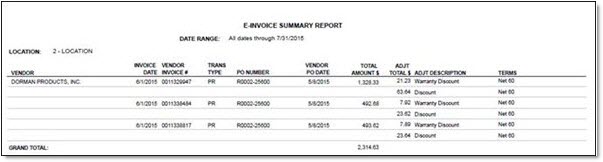
The 'e-Invoice Summary Report' can be accessed from the e-Invoice Reports screen. Enter any portion of a vendor's name in the 'Vendor' text box to filter the report.
The following is an example of the 'e-Invoice Summary Report'.
The following is an example of the 'e-Invoice Detail Report', first and last pages.
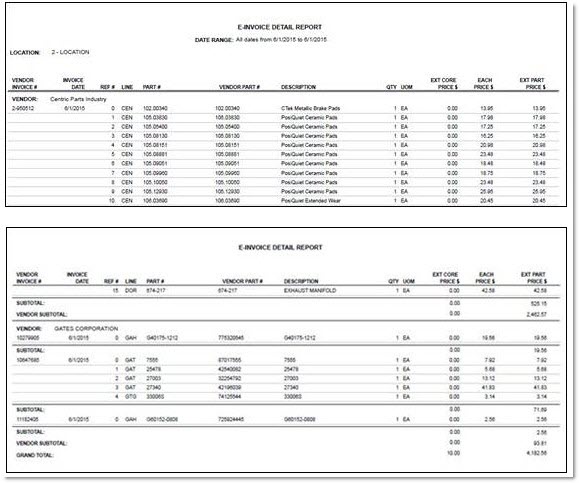
All field values on the report are provided by the supplier or manufacturer (via Corcentric) for the store that made the purchase. The eInvoice Report is NOT to be considered a formal invoice from the supplier but is for informational purposes only.
When either an EDI eINV 810 or an EDI ASN 856 is received in the store from either VAN, and no EDI PO Confirm, 855 has been received, the 'Vdr Reply' column on the Purchasing Dashboard grid displays 'Confirmed' for that PO.
Since the VAN Corcentric does not currently support sending EDI PO Confirm 855 files to the store, there is no way for the application to know if a EDI PO 850 file sent from the store to a vendor via the VAN Corcentric has been accepted, adjusted or rejected by the vendor. Therefore, a value of 'Adjusted' or 'Rejected' never displays for an application PO sent to vendors via the VAN Corcentric.
The vast majority of vendors on Corcentric send purchase order responses (EDI eINV 810 and EDI ASN 856) with vendor part numbers that do not match the buyer store's part numbers sent in the EDI PO 850. More often than not, the vendor part numbers exclude the manufacturer line code. When the EDI eINV 810 is received and processed in the store, the vendor part number must be matched with the most likely store part number on the PO.