PN Code Summary Report
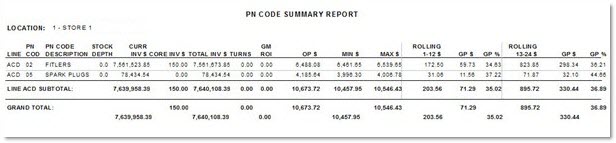
The P/N Code Summary Report screen is used to generate the 'PN Code Summary Report' for a single location. The 'PN Code Summary Report' reports the stock depth, inventory values, inventory turns, ROI, and sales history for each line and P/N code.
The report is an ad hoc (on demand), dynamic report with no date parameters. Report results are calculated each time the report is run, based on current dates and current inventory values. Changes to PN Codes for the inventory items being reported can have an impact on the dollar totals reported.
Menu Path: Reports, Inventory, P/N Code Summary, P/N Code Summary Report screen
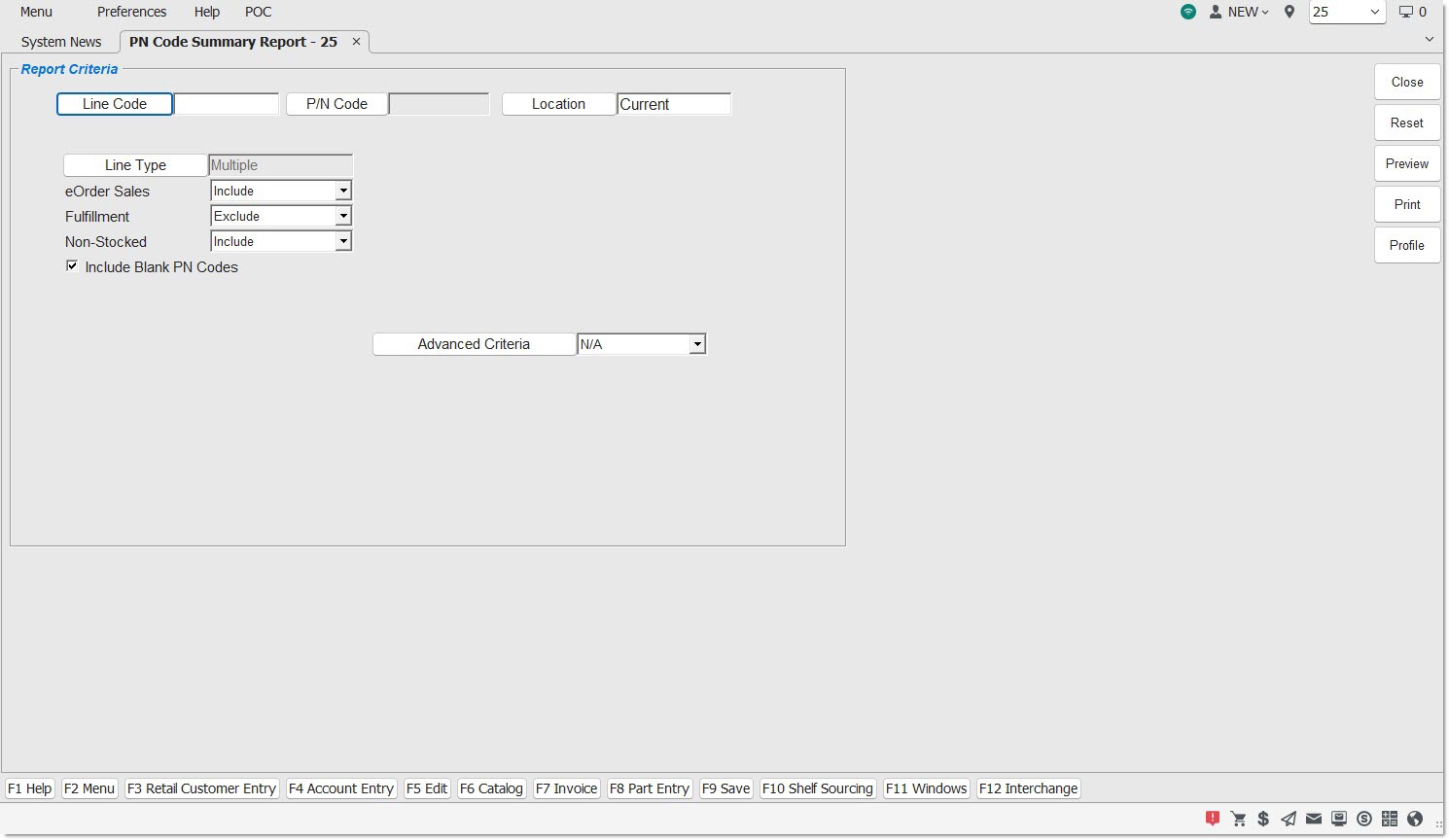
Report Criteria
Line Code
Filters by a selected code. Displays the word 'Multiple' when more than one but less than all line codes and/or P/N codes are selected. A blank field indicates all line codes. Click the button to display the 'Browse Line Codes' window to search for a specific line code. Accelerator key is 'Alt' + 'L'.
P/N Code
Filters by a selected PN code. Click the button to initiate a search for a specific P/N code per line code. Accelerator key is 'Alt' + 'N'.
Location
Filters by the selected store location. Click the button to display the 'Browse Locations' window to search available store location, with User Security permission. Accelerator key is 'Alt' + 'O'.
Line Type
Filters by the line type, as set in the 'Type' field in the Line Code Entry screen.
Click the button to display the 'Line Types' pop-up used to select specific line type(s).
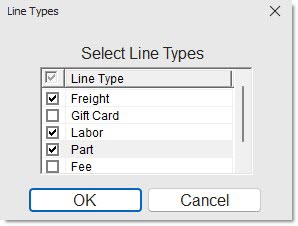
Options are:
-
'Freight'
-
'Gift Cards'
-
'Labor'
-
'Parts'
Include any 'Line Type' by checking the box(es). Check the checkbox in the header to report all line types. Uncheck the checkbox in the header to deselect all line types.
-
When all are checked, 'All' displays in the 'Line Type' field.
-
When more than one but less than all types are checked, 'Multiple' displays in the 'Line Type' field.
-
When only a single line type is checked, that type displays in the 'Line Type' field.
Note: Reports both gift cards and merchandise cards when 'Gift Cards' is selected.
Internet Sales
Determines whether Internet sales are reported.
Options are:
-
'Include' - Reports Internet sales and store sales.
-
'Exclude' - Does not report Internet sales.
-
'Only'- Only reports Internet sales.
Fulfillment
Determines whether fulfillment orders are reported.
Options are:
-
'Include' - Reports fulfillment orders.
-
'Exclude' - Does not report fulfillment orders.
-
'Only'- Only reports fulfillment orders.
Field displays only when the B2C system appswitch is enabled.
Non-Stocked
Determines whether non-stocked parts are reported.
Options are:
-
'Include' - Reports sales and inventory values for non-stocked parts and stocked parts.
-
'Exclude' - Does not report sales and inventory values for non-stocked parts.
-
'Only'- Only reports sales and inventory values for non-stocked parts.
Include Blank PN Codes
Filters by blank PN codes, when checked. Excludes blank PN codes, when unchecked.
Advanced Criteria
Displays the 'Inventory Report Overrides' window used to set override defaults for the inventory report, when clicked. When 'Reload Defaults' is clicked, uses the defaults from the Inventory Report Defaults screen. Uses the settings in the Inventory Report Defaults screen based on the value is selected from the drop-down list.
Options are:
-
'N/A' - Ignores any default settings that were set up in the Inventory Report Defaults screen, or any override selections that might have been made at run-time in the 'Inventory Report Overrides' window accessed by the 'Advanced Criteria' button. The report is based solely on what the user enters on the report selection screen.
-
'Use Defaults' - Includes any records matching the defaults set up in the Inventory Report Defaults screen, when selected.
-
'Inverse Defaults' - Includes any records matching the inverse (opposite) of the defaults set up in the Inventory Report Defaults screen, when selected. Defaults are used in addition to anything selected on the report selection screen.
-
'Use Overrides' - Includes any records matching the criteria the user may have entered in the 'Inventory Report Overrides' window. Overrides are used in addition to anything selected on the report selection screen. The 'Use Overrides' value only displays if the 'Inventory Report Overrides' window was opened using the 'Advanced Criteria' button and overrides were selected. (An override means overriding pre-selected defaults.)
-
'Inverse Overrides' - Includes any records matching the inverse (opposite) of the criteria set up in the Inventory Report Defaults screen, when selected. Inverse overrides are used in addition to anything selected on the report selection screen.
P/N Code Summary Report
The following is an example of the 'PN Code Summary Report'. The report sorts by 'Line' and 'PN Code' and subtotals Inventory and Sales by Line Code and includes grand totals at the end.