Supplier Line Codes
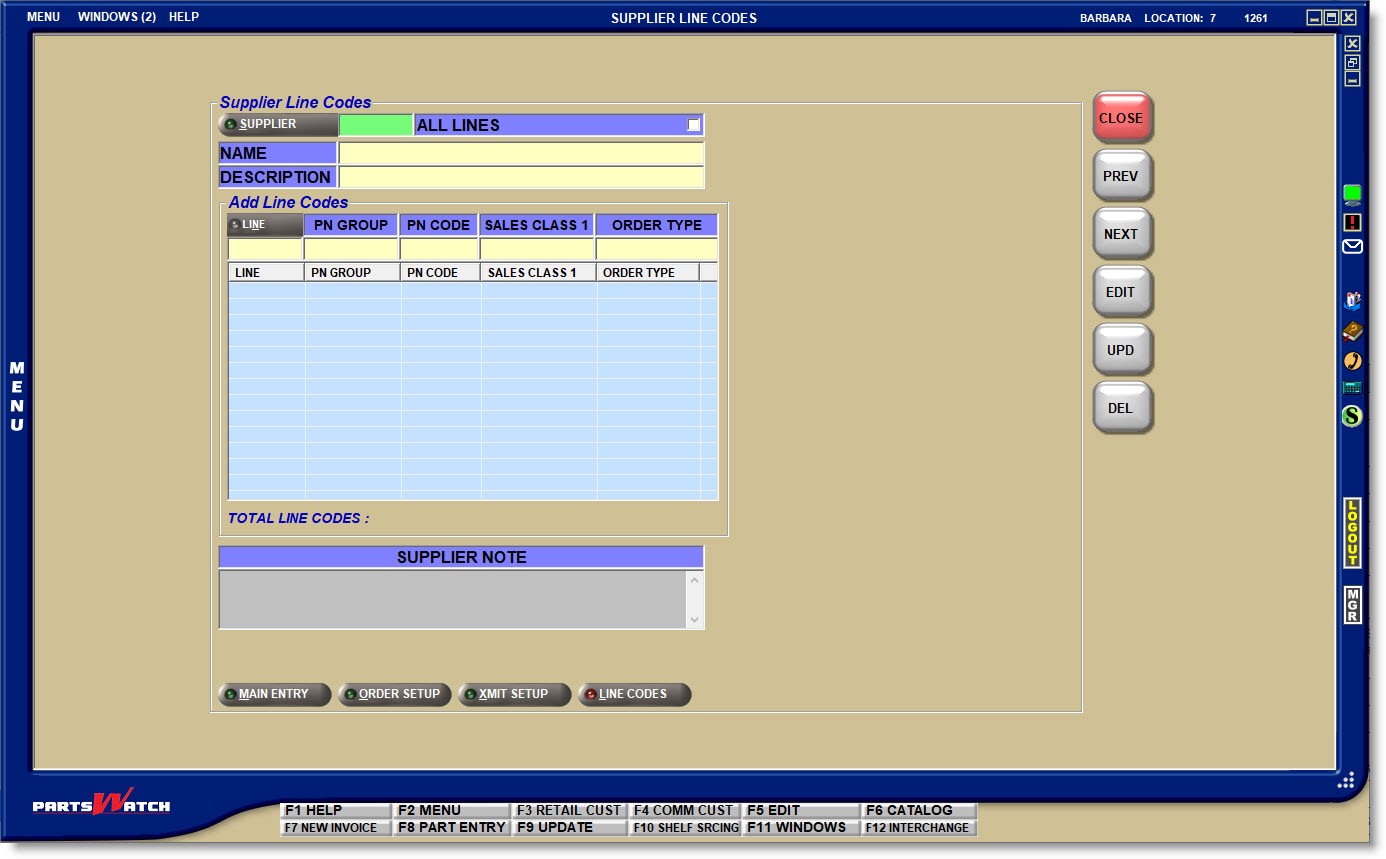
The SUPPLIER LINE CODES screen is used to set up the Line Codes that are ordered from each Supplier. By setting up several or all Line Codes under the same Supplier, the parts under the Lines can be ordered at the same time.
Menu Path: Vendor, Supplier, Line Codes, SUPPLIER LINE CODES screen
SUPPLIER
Enter a Supplier Code, or click the 'SUPPLIER' button to open the 'BROWSE SUPPLIERS' window to select a Supplier. The Supplier's 'NAME' and 'DESCRIPTION' displays as well as any Line Codes under the Supplier if there are any.
ALL LINES
Determines whether or not all lines are ordered from the Supplier. The value of the 'ORDER ALL LINES' checkbox on the SUPPLIER ORDER SPECIFICS screen displays in the field and editing the 'ALL LINES' field also edits the 'ORDER ALL LINES' field, and visa versa.
The 'Add Line Codes' section displays if 'ALL LINES' is unchecked and the 'Exclude these Lines' section displays if 'ALL LINES' is checked.
- Checked - All Line Codes will be ordered under the Supplier.
To exclude one or more Lines, enter a 'LINE' or click the 'LINE' button to open the 'BROWSE LINE CODES' window to select a Line Code in the 'Exclude these Lines' section.
The 'PN GROUP', 'PN CODE', 'SALES CLASS 1', and/or 'ORDER TYPE' part filters gray out and are unavailable for excluded lines.
- Unchecked - Only the Line Codes that are manually set up in the 'Add Line Codes' section will be ordered from the Supplier.
Enter a 'LINE' or click the 'LINE' button to open the 'BROWSE LINE CODES' window to select a Line Code and optionally enter part filters to narrow the parts included by 'PN GROUP', 'PN CODE', 'SALES CLASS 1', and/or 'ORDER TYPE'. When setting up more than one filter for a Line Code, the system considers only the parts that match all the selected filters.
To delete a Line Code, highlight the Line Code in the grid and click the 'DEL' button.
TOTAL LINE CODES
Displays the total number of line codes that are excluded from orders if the 'ALL LINES' checkbox is checked, or displays the total number of line codes that will be considered for orders if the 'ALL LINES' flag is unchecked.
SUPPLIER NOTES
Enter up to 128 alphanumeric/special characters that will be tracked with purchase orders for the Supplier. The 'SUPPLIER NOTE' also displays on the SUPPLIER ENTRY screen and the PURCHASE ORDER INFO screen.