Paid In To Safe
The Paid In To Safe screen is used to create a transaction paid to the safe.
Menu Path: Invoicing, Cash Drawer, Management Functions, Paid In To Safe, Paid In To Safe screen, or from the Drawer Management screen by clicking the 'Paid in to Safe' button.
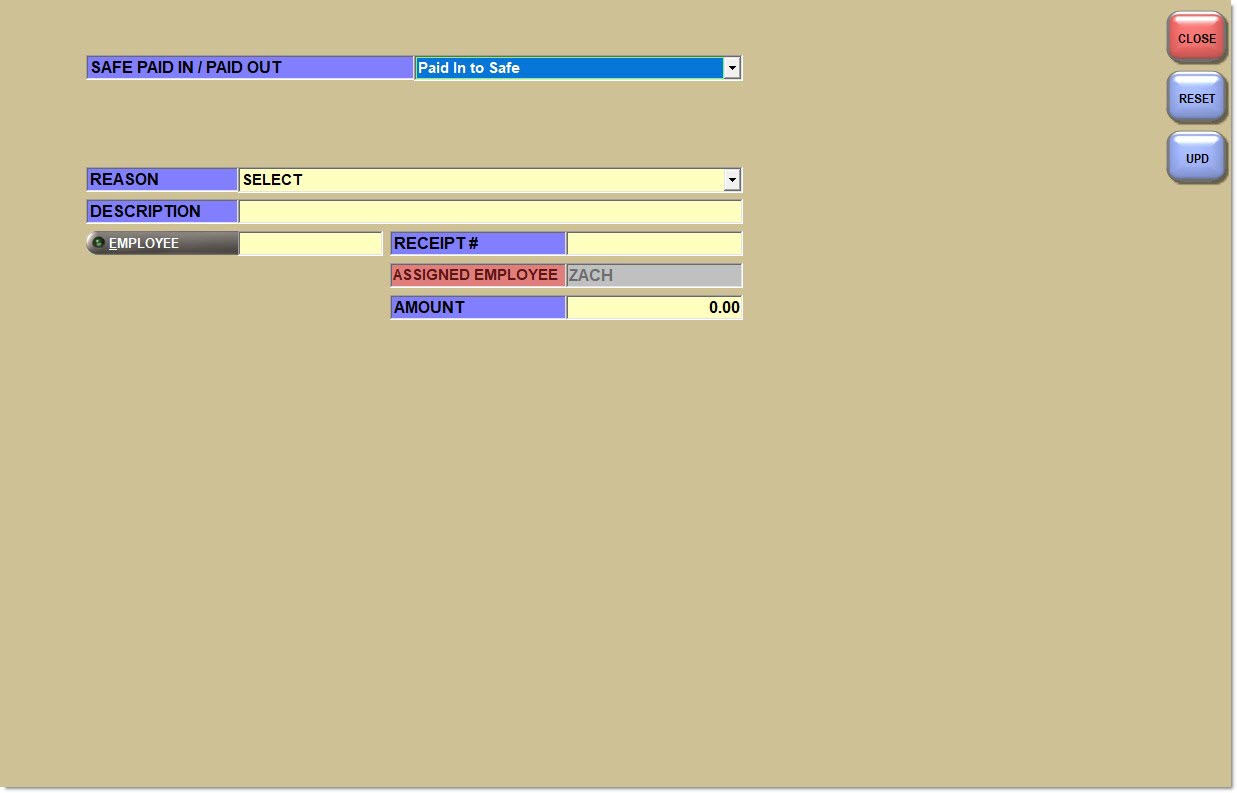
Safe Paid In / Paid Out
Specifies the transaction to be performed.
Options are:
-
'Paid Out From Safe' - When selected, the Paid Out From Safe screen displays.
-
'Paid In To Safe' - When selected, the Paid In To Safe screen displays. Default.
Reason
Displays the reason that cash is being paid into the safe.
A Reason Code can be added, edited or deleted in the Reason Code Setup screen. However, the following reason codes are predefined and used by the system and are not available from the Paid In To Safe screen; therefore, they cannot be edited or deleted.
-
'Drawer # <Drawer #> Ending Cash' - The system automatically makes a Paid In To Safe with the 'Reason' of 'Drawer # <Drawer #> Ending Cash' for the amount of the Paid Out From Drawer with the 'Reason' of 'Ending Cash' when the drawer is closed. The 'Reason' of 'Drawer # <Drawer #> Ending Cash' cannot be used to create a manual Paid In To Safe.
-
'Drawer # <Drawer #> Close Amount' - The system automatically makes a Paid In To Safe with the 'Reason' of 'Drawer # <Drawer #> Close Amount' for the amount collected from the Drawer Reconciliation screen when the drawer is closed. The 'Reason' of 'Drawer # <Drawer #> Close Amount' is not available for manual use from the Paid In To Safe screen.
Description
Displays the entered description for the paid in, up to 32 alphanumeric and special characters. Optional.
Employee
Identifies the active employee or manager whom the 'Assigned Employee' received money from or gave money to. Click the button to display the 'Browse Employees' window to search for an employee.
Receipt #
Displays the entered receipt number, up to 16 alphanumeric characters. Optional.
Assigned Employee
Identifies the employee logged into the screen and cannot be edited.
Paid In To Safe Receipt
The Paid In/Out Receipt document type in the 'Type' field in the 'Printer Assignment' window is used to print all printed receipts for cash management. The printer can be a slip or regular printer.
The 'Paid In/Paid Out Receipt Font Size' setting in the Store Invoice Options screen, 'Extended' tab determines the size of the text on the receipt. The font can range from between size 8 and 20 font.
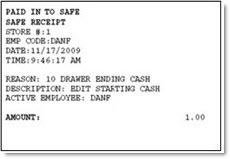
The receipt prints the following information.