Day Sales Order
Select Mode: Shelf Purchase Order / Stock Adjustment Order
Order Method: Day Sales Order
Day Sales orders, similar to Replenishment orders, which order only quantities sold, set part order quantities based upon the number of units sold within a sales history period. The sales history period is typically in days instead of months.
However, a Day Sales order allows a dynamic sales history period (up to the last 30 days) to be defined while a Replenishment order uses a static sales history period between the date of the last Replenishment order and the date of the new Replenishment order.
The 'Sales' tab displays when 'Day Sales Order' is selected from the 'Order Method' drop-down.
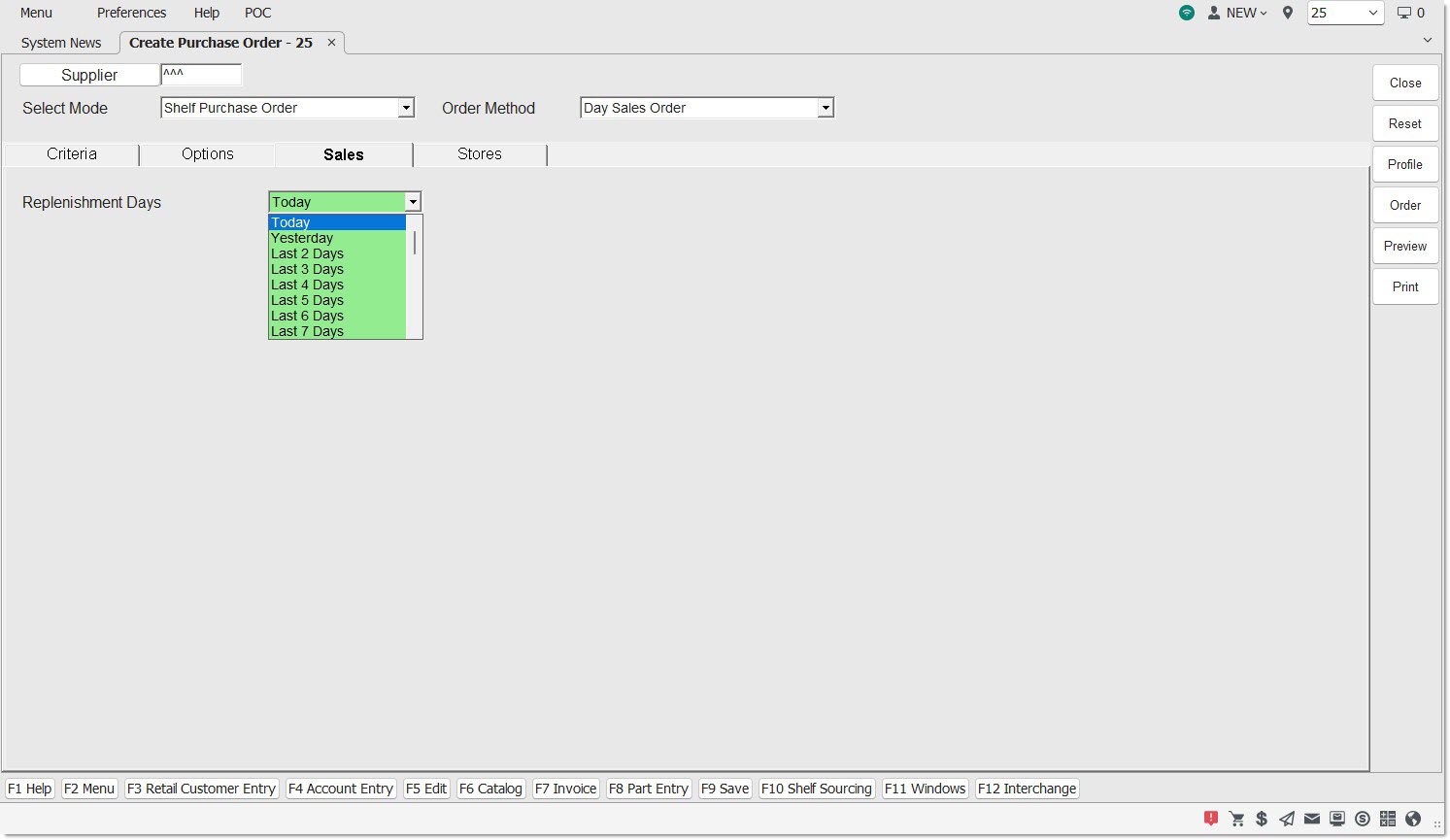
Optionally click the 'Criteria' tab and select or edit the Line Codes purchased under the Supplier and/or set up the filters used to narrow the parts that will be considered for the order.
Optionally click the 'Options' tab to enable/disable the predefined conditions that further refine and filter the parts that will be considered for the order.
Available Default/Override (left-side) filters are:
- 'Fill Policy'
- 'Delivery Days'
- 'PO Part Cost Level'
- 'Use Buy Qty Rule'
- 'Min Cost Threshold'
- 'Min Units Threshold'
- 'Min Packs Threshold'
- 'Min Weight Threshold'
- 'Min Volume Threshold'
- 'Cost Exchange Rate'
- 'Include Core in Min Cost'
- 'Create Order Below Min'
- 'Multistore PO Type'
- 'PO + or – Percent'
Additional (right-side) filters are:
Optionally click the 'Stores' tab and select the stores for a multi-store order.
From the 'Sales' tab select the days the order will cover:
Replenishment Days
The field defaults to the value set up in the system-level 'Default Day Sales Days' setting. Click the drop-down field and select the sales history period to use a different value for the order.
Click the 'Preview' or 'Print' button to output a report of the parts to be ordered, or click the 'Order' button to create the order.
The following rules are used for Day Sales Order creation:
- After applying the part selection rules from the 'Criteria' tab, only those parts that both "affect stock" and "affect sales history", within the "relative" date range specified in the Replenishment Days field are included in the order.
- Note: The modifier used for invoice finalization determines whether or not 'Affect Stock'/'Affect Sales History' is tracked for a part. The 'Affect Sales History'/'Affect Stock' flags can be reported using the 'COLUMNS DISPLAYED' feature on the LISA TRANSACTION REPORT.
- For example, if 'Last 2 Days' is selected, the system examines part sales for the last two days. If Part A had 10 sales during this time frame, then 10 units will be ordered.
- The order quantity per part is set to the number of units sold (less returns and UNDOs) within the "relative" date range as selected in the Replenishment Days drop-down using the relative date rules.
- Note: The rules are similar to the "" rules used on the Report screens except an order creation date/time replaces a report run date/time.
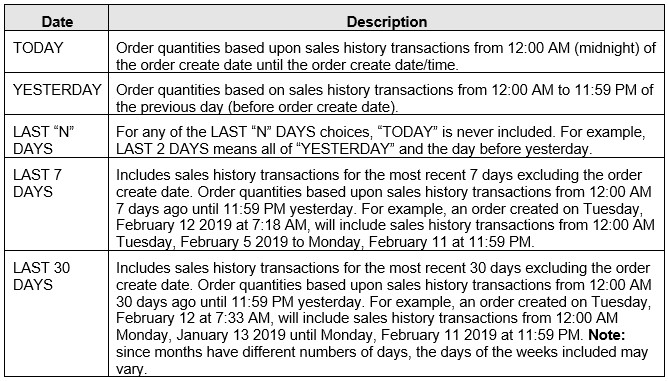
- Following are examples of the Replenishment Days selections:
- Finally, controls from the 'Options' tab are applied.